Ignorance is not a defense. Due care is a record, not an intention. See what the law expects →
How SanctumShield works, in plain English.
By Lindsay Hiebert · Founder · CISSP
An honest CISO's guide to what we see, what we never touch, and what actually changes when you upgrade.
Every other AI security vendor wants to install an agent on your servers, read your firewall logs in real time, or get an admin credential to your tenant. SanctumShield does none of that. This page exists so you can decide for yourself whether our approach is the right trade-off for your organization.
New to this? Start with the Field Guide.
The same ideas as the CISO-grade explainer below, told in plain English with pictures you’ll remember — for the board member, the general counsel, or anyone who wants the gist without the jargon.
- Start here — AI Governance in Plain English →The full tutorial: what you're really doing when you use SanctumShield, and how it does the hard part for you.
- 1. Shadow AI: the tools you didn't know you had →The iceberg — and why the hidden mass is usually the largest.
- 2. Envelopes, not letters: seeing AI use without reading your data →You share destination addresses, never the contents. Why that's both trustworthy and private.
- 3. Doors, robots, and plumbing: the three things you're inventorying →Endpoints, agents, and APIs — in plain pictures.
- 4. Declared vs. observed: why the gap is the point →The space between what you list and what your own logs show is where the real risk hides.
- 5. From diagnosis to proof: the artifacts and why they matter →The small stack of documents that takes you from 'we think we're fine' to 'here's the proof.'
- 6. A photograph vs. a film: why governance isn't one-and-done →A one-time snapshot goes stale. Staying governed is a film SanctumShield keeps current.
SanctumShield is one of very few
— and likely the only one for the mid-market.
SanctumShield is one of very few products — and likely the only one purpose-built for the mid-market — that generates the exact artifact your board, your auditor, your regulator, and your cyber insurance underwriter are all asking for — a customized, regulation-anchored AI Acceptable Use Policy plus a board-ready Executive Risk Report with real HIPAA / SOC 2 / EU AI Act clause citations — in minutes, from a guided from a browser, without an agent, credentials, or network access. Nothing else in the market produces that artifact at all at the mid-market tier.
Why this beats every alternative you could line up.
- 01Palo Alto AI Access Security · CrowdStrike · Netskope · Zscaler
Catch AI traffic at the network or endpoint. None generate an AUP. None produce a regulation-anchored risk report. You still need a consultant or law firm on top.
- 02Vanta · Drata · Secureframe
Track whether controls exist — checklist automation. They don't generate the AUP, don't analyze logs, don't produce findings. The SOC 2 auditor will ask about AI governance; Vanta's dashboard has no answer.
- 03OneTrust · BitSight · SecurityScorecard
Automate vendor due diligence (SIG / CAIQ). They cover known vendors, not shadow AI. No AUP output.
- 04Credo AI · Holistic AI · Fairly AI
AI governance for Fortune 500 model-training orgs. A 200-person healthcare SaaS doesn't train models — it uses twelve SaaS AI tools. Wrong buyer profile.
- 05Big 4 · Deloitte · PwC · EY · KPMG
Do produce a similar artifact. In 6–12 weeks. For $50K–$250K. PowerPoint deliverable. Ages the moment it's filed.
- 06Outside privacy counsel
$15K–$40K and 2–4 weeks for the AUP alone. No log analysis, no re-run next quarter.
SanctumShield is one of very few places in the market — and likely the only one for the 50–2,000-employee mid-market — where the artifact the buyer actually needs (customized, defensible, log-verified, regulation-anchored, board-ready, re-runnable) exists as a self-serve product. Everything else is either a different category entirely, or the same category at 100× the cost and 1000× the time.
Built, designed, and developed specifically for organizations that don’t have dedicated platform engineering or security teams.
Why the obvious "differentiators" are second-tier.
People assume the advantage is AI, or ease-of-use, or price. All three are real, but none of them is the pitch. Here's the honest ranking.
- →"AI-powered" — every competitor claims this. Table stakes. Not differentiating.
- →"Current 2026 frameworks, monthly updates" — strong feature, but it's what enables the uniqueness. A supporting pillar, not the pitch.
- →"Easy to use" — subjective. Anyone can claim it.
- →"1/10th the cost" — the price is a consequence of the structural simplicity (stateless browser app, no agent, no integration). Price never leads a CISO purchase — capability does. $99 closes the deal after the CISO has already decided the product is what they need.
"Where does the data come from?"
It's the right question. If a tool claims to assess your organization's exposure to Shadow AI, you should immediately ask: what data is it looking at, where did it come from, and how did this vendor get it?
Most AI security tools answer this with one of three things: "we installed an agent," "we have an integration with your firewall," or "we're a man-in-the-middle proxy on your traffic." All three create real security risk and a real procurement burden. SanctumShield's answer is different — and it's the entire reason a 200-person company can use this product without an InfoSec review committee.
We never touch your network.
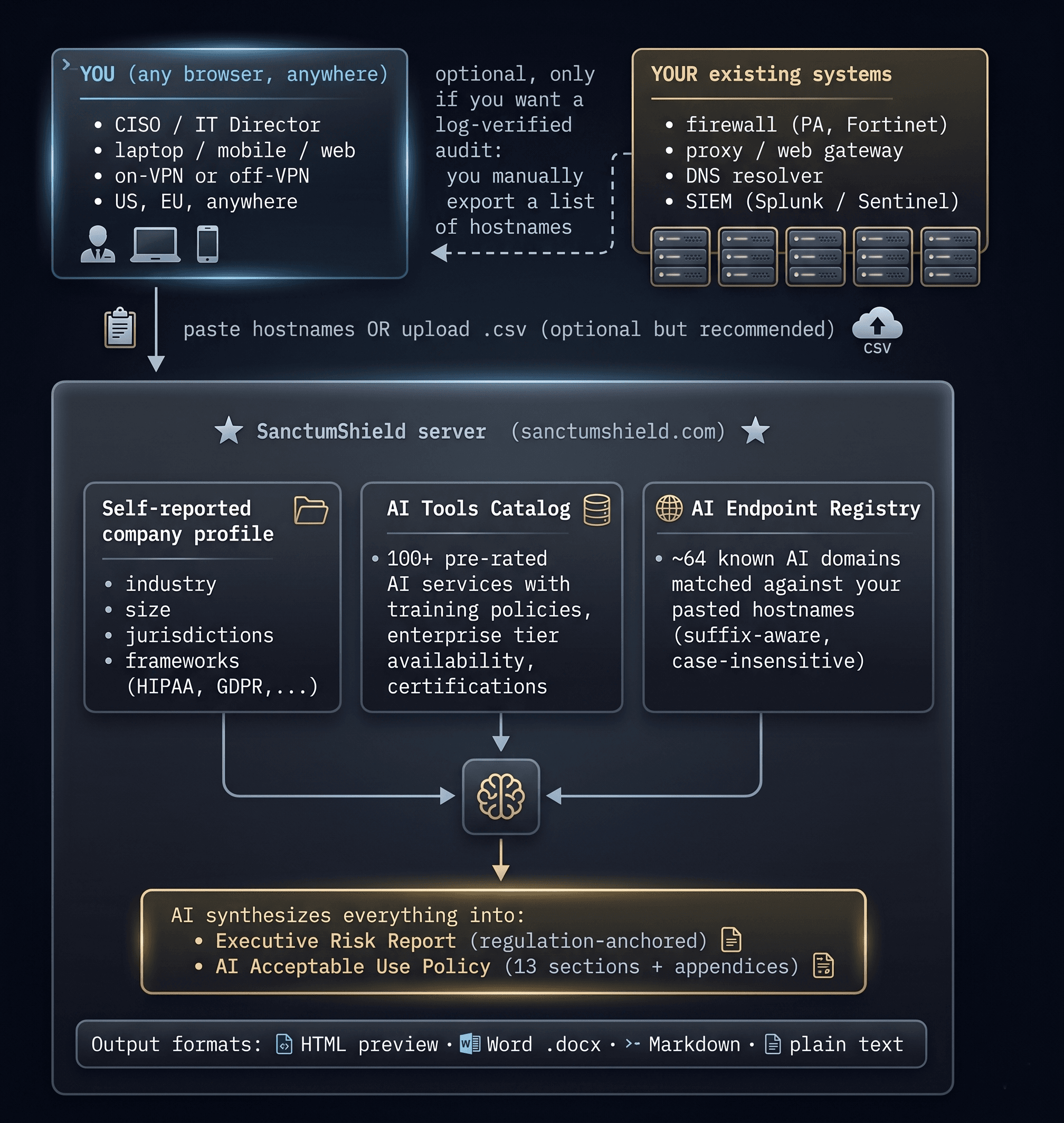
SanctumShield is a stateless web application. You open it in any browser, on any device, anywhere on the internet. We have no agent on your servers, no integration with your firewall, no access to your tenant, no API tokens, no VPN tunnels. Here is the full data flow:
- 🔒 connects to your corporate network
- 🔒 installs an agent or daemon on your servers
- 🔒 requires firewall changes, VPN access, or open ports
- 🔒 asks for credentials to your cloud, your SIEM, or your identity provider
- 🔒 sees any data except what you explicitly paste or upload
- 🔒 retains your log data after the audit is generated
- 🔒 sells, syndicates, or shares your inputs with anyone
What you tell us, and
what we do with it.
Every audit SanctumShield generates is built from three inputs. You provide all three. We use them to tailor the output to your organization. Nothing in the audit is generated from data we collected behind your back — because there is no behind-your-back data to collect.
Company Profile
You tell us your industry, employee count, the jurisdictions you operate in, and the compliance frameworks you're in scope for (HIPAA, GDPR, SOC 2, NIST AI RMF, EU AI Act, ISO 27001, CCPA). Five fields. Sixty seconds.
AI Tools Inventory
You select the AI tools your employees are known to use from our catalog of 96 pre-rated services. Each tool has a pre-assessed risk tier (LOW / MEDIUM / HIGH / CRITICAL), training-on-data policy, enterprise-tier availability, and certification status. Saves you the per-tool research time.
Network Log Sample
You paste — or now upload as a CSV file — a list of outbound hostnames from your firewall, proxy, or DNS logs. We match each hostname against our registry of 71 known AI API endpoints and return real hit counts per service. This converts the audit from "informed opinion" into log-verified evidence.
Input 03 is optional. Many SanctumShield customers run their first audit on Inputs 01 + 02 alone, then add log analysis once they've seen the value of the report. The audit is still specific and useful with two inputs — it just shifts from evidence-based to assessment-based.
The Sanctum. The Shield.
SanctumShield is two layers of one platform. The Sanctum is the governance baseline — what good AI policy looks like for your organization. The Shield is the governance evidence — what's actually happening inside your perimeter and what to do about it.
What good AI looks like.
- →AI Acceptable Use Policy — 14 sections + 3 appendices, customized to your industry, frameworks, and tool inventory. ~3500 words, legally credible, downloadable as Word, Markdown, plain text, or HTML.
- →AI Tools Registry —96 pre-rated AI services with training policies, enterprise tier availability, and certification coverage. Saves hours of per-tool research.
- →Compliance Mapping — HIPAA, GDPR, CCPA, SOC 2, NIST AI RMF, EU AI Act, ISO 27001 — mapped to your declared frameworks with specific clause citations.
What's actually happening.
- →Free Shadow AI Risk Calculator — 12 questions, instant departmental risk score, three headline findings. No account, no cost.
- →Network Log Analysis — Paste or upload your firewall/proxy/DNS hostnames. We match against our registry and return real hit counts.
- →Executive Risk Report — AI-synthesized 5-finding board-ready report with regulatory clause citations, business impact, and a prioritized 90-day action plan.
Want to see what the actual output looks like for a real scenario? View the live Acme Health example →
What you actually do with
an AUP and a risk report.
Every SanctumShield audit produces two artifacts. Both are immediate (minutes from start to download), both are accurate (regulation-anchored, no hallucinated clauses), and both are downloadable as Word documents you can forward to the people who need them — your legal counsel, your board, your auditors, your insurance broker.
AI Acceptable Use Policy
Every regulated industry now needs a written AUP for AI. SOC 2, HIPAA, and EU AI Act auditors explicitly ask whether you have one. Cyber insurance renewal forms ask. Enterprise procurement reviews ask. Without one, your answer to "how does your company govern AI?" is "we don't" — which is increasingly disqualifying.
13 production-grade sections covering scope, definitions, approved tools, prohibited uses, data classification, department-specific guidelines, AI agent policy, vendor assessment, security requirements, regulatory compliance, incident reporting, employee accountability, and policy governance — all tailored to your industry, frameworks, and tool inventory. Plus three appendices: tools registry, request form, and a quick-reference card.
Download as .docx → forward to legal counsel for review → publish through your standard policy distribution channel → require employee acknowledgment annually → revise on the same cadence as your other corporate policies.
Generic templates from Google or LinkedIn never reference your specific tools, jurisdictions, or frameworks. Outside privacy counsel will draft you one for $15K–$40K and 2–4 weeks. SanctumShield delivers a comparable document in minutes, anchored to specific regulatory clauses, customized to your environment, and regenerable on demand whenever your tool inventory changes.
Executive Risk Report
When your board asks "what's our AI risk posture?" you need a credible answer the same week — not a slide deck, not a generic risk matrix. A real report that names actual tools your employees are using, cites actual regulatory clauses your industry must comply with, and prescribes actual actions your team can take in the next 90 days.
An overall risk score (0–100), a board-ready quotable headline, a 2-paragraph executive summary, 5 prioritized findings with severity / evidence / business impact / regulatory citations, a tool risks table with APPROVE / CONDITIONAL / DENY recommendations, a regulatory exposure summary, and a 90-day prioritized action plan with named owners and effort levels.
Download as .docx → present in your next board meeting or risk committee → use the action plan to prioritize the next quarter → cite specific findings during enterprise procurement reviews ("we rated Cursor CONDITIONAL and require the Business tier") → re-run monthly to track improvement.
Big 4 consulting will produce a comparable report in 6–12 weeks for $50K–$250K. Palo Alto AI Access Security will produce one — but only if you've already deployed their enterprise stack and have a dedicated security team. SanctumShield delivers a comparable report in under 20 seconds, regulation-anchored, grounded in your real tool inventory and (optionally) your real network log data.
- Immediate. Audit and policy generated in minutes from a guided assessment, not weeks. No procurement cycle, no scoping meeting, no implementation project.
- Easy to use. Five form fields and a few clicks. Your CISO does the whole thing themselves in fifteen minutes — no consultant, no integration team, no internal champion required.
- Accurate and verifiable. Every regulatory citation in the output is a real, real-world clause (HIPAA §164.502(e), SOC 2 CC6.1, EU AI Act Article 5) that your counsel can look up in the source regulation. No hallucinated laws, no made-up section numbers.
What the free tool gives you,
and what changes when you upgrade.
The free Risk Calculator is genuinely useful on its own. We don't gate it, we don't ask for an email to see your score, and we don't degrade it to push the upgrade. Here's exactly what you get at each tier.
| Capability | Free Calculator | SanctumShield · $99/mo |
|---|---|---|
| 12-question Shadow AI Risk Calculator | ✓ | ✓ |
| Departmental risk score + 3 headline findings | ✓ | ✓ |
| No account, no email gate, no credit card | ✓ | — |
| AI Tools Catalog (96 pre-rated services) | — | ✓ |
| Network log analysis (paste or CSV upload) | — | ✓ |
| Executive Risk Report (AI-synthesized, 5 findings, regulatory citations) | — | ✓ |
| AI Acceptable Use Policy (14 sections + 3 appendices) | — | ✓ |
| Word (.docx) · Markdown · plain text · HTML downloads | — | ✓ |
| All 7 compliance frameworks (HIPAA, GDPR, CCPA, SOC 2, NIST AI RMF, EU AI Act, ISO 27001) | — | ✓ |
| Email support from the founder | — | ✓ |
Month-to-month, cancel anytime. No credit card required to run the free calculator. Your generated policy and audit documents are yours to keep regardless of subscription status.
Upcoming Business and Scale tiers will add team acknowledgment tracking, policy version history, compliance evidence audit trail, REST API access, white-label branding, and quarterly regulatory update reports. If you need any of those capabilities for your organization, join the waitlist and we'll let you know the moment they ship.
Six reasons this passes
a security review.
No agent. No daemon. No install.
There's nothing for your endpoint team to deploy, patch, or audit. The product is a web application — open it in a browser, use it, close the tab.
No credentials. No API tokens.
We never ask for your Splunk login, your Microsoft tenant admin, your AWS root key, or your Palo Alto Panorama credentials. There is nothing for an attacker to compromise on our side.
No network access required.
We don't need a VPN tunnel into your network. We don't need you to whitelist our IP. We don't need you to open a firewall port. The product works from outside your perimeter, by design.
You control what we see.
We see exactly what you choose to paste or upload — nothing more. If you sample logs from one VLAN, we only see that VLAN. If you skip log analysis entirely, we never see any of your traffic.
Hostnames only — never payload.
Even when you paste log data, we only need outbound hostnames (api.openai.com, character.ai, cursor.sh). We don't want and don't accept request bodies, query parameters, headers, or any payload data.
Output is yours to verify.
Every regulatory citation in the audit is a real, real-world clause — §164.502(e), CC6.1, Article 22 — that you can look up in the source regulation. The output is downloadable in Word, Markdown, plain text, and HTML so your counsel can review it offline.
How to provide log data
(if you want the strongest audit).
Network log analysis is optional but it converts the audit from "informed opinion" into "evidence." All you need is a list of unique outbound hostnames your network has connected to in the last week, month, or quarter. You can paste them directly into the dashboard textarea, or upload them as a CSV / TXT / LOG file (the file upload was added in this build). Here's how to get that list from the systems you most likely already have:
Click any row to expand step-by-step instructions for that source. All eight sources are collapsed by default — pick the one that matches the system you already have.
▶Cloudflare Zero Trust / Cloudflare Logpush
EASIEST
Cloudflare Gateway HTTP logs export a clean CSV with one row per outbound request. In your Cloudflare dashboard, go to Logs → Logpush → Create job → HTTP requests, set the destination as a temporary R2 bucket, download the file, extract the unique hostnames column with any spreadsheet, and paste or upload here.
▶Palo Alto Panorama / NGFW
EASY
Monitor → Logs → Traffic → filter by destination port 443 → Export CSV. Open the CSV, take the unique values from the 'Destination' or 'URL Category' column, paste here. For a smaller export: filter by application = 'web-browsing' or 'ssl' first.
▶Fortinet FortiGate
EASY
Log & Report → Forward Traffic → Add Filter (action=accept, dstport=443) → Download. The CSV will have a 'destination' or 'hostname' column. Use the unique values.
▶Cisco ASA / Firepower
MODERATE
Reporting → Connection Events → filter to https traffic → export. Cisco's CSV format varies by version; the column you want is 'Destination FQDN' or 'URL'. If only IPs are exported, run a reverse-DNS pass first.
▶AWS VPC Flow Logs
MODERATE
VPC Flow Logs only capture IPs by default, not hostnames. If you need hostnames, enable Route 53 Resolver query logging and export from CloudWatch Logs Insights with a query like: filter @logStream like /vpc-flow-logs/ | stats count(*) by query_name. Take the query_name column.
▶Microsoft Sentinel / Azure Monitor
MODERATE
Use a KQL query against AzureFirewallApplicationRule or your DNS analytics table: AzureDiagnostics | where Category == 'AzureFirewallApplicationRule' | distinct Fqdn_s. Export results as CSV.
▶Splunk
EASY
Run a search like: index=firewall sourcetype=pan:traffic | stats count by dest_host | sort -count → Export → CSV. Or for proxy logs: index=proxy | stats count by url_domain.
▶Plain dnsmasq / BIND / Pi-hole
EASIEST
Just `tail` your DNS query log file and pipe through `awk` or `cut` to extract the queried hostname column. Pi-hole has a built-in 'Query Log' export that's already a CSV.
Just unique outbound hostnames, one per line. That's it.
chat.openai.com
claude.ai
cursor.sh
api.anthropic.com
character.ai
huggingface.co
...etc
You can include hit counts, timestamps, source IPs, or other columns — we only read the hostname. We never store, log, or forward any other fields.
Don't want to export logs yourself?
We'll build a connector for you.
Most customers run their first audit on a paste or CSV upload — that works for the overwhelming majority of organizations. But if your team doesn't have time to extract logs themselves, or if you want continuous evidence rather than a one-time snapshot, we develop custom log connectors tailored to your specific environment. Every engagement is scoped to your requirements: which log destination, which fields, which cadence, and what level of post-launch support you need.
What you get
- →A dedicated, read-only connector built for your specific log destination — Splunk, Datadog, Cloudflare Logpush, AWS CloudWatch, GCP Cloud Logging, Microsoft Sentinel, Elastic SIEM, or any custom system you use.
- →Scoped credentials only — no admin access, no write permissions, hostname-only data fields.
- →Daily roll-up of unique outbound hostnames pushed into your SanctumShield account, automatically used to enrich every audit.
- →Engineering build + customer-side deploy + verification + post-launch support — typical timeline measured in weeks, not months.
- →Owned and maintained by SanctumShield going forward — no ongoing engineering work for your team.
Opens a short form. We respond within one business day. No sales call required — just a focused scoping conversation if your environment looks like a fit.
Custom log connectors are an optional add-on, completely independent from the monthly subscription. You do not need a connector to use SanctumShield — the paste-or-upload flow is sufficient for nearly every organization. Pricing depends on the scope and complexity of your environment; reach out and we'll scope a quote within one business day.
Now you know what we see.
Run it on your org.
Start with the free Shadow AI Risk Calculator — twelve questions, sixty seconds, no account required. If the score is alarming (and for most organizations in 2026, it is), activate SanctumShield for $99/month and run the full audit with your own log data. Month-to-month, cancel anytime.